
Ask the Sims Reads Your Screenshots Now: What To Drop In
By Jake Hari
October 18, 2026

There is a picture button inside the Ask the Sims field now. Tap it on your phone and pick a screenshot, or drag one onto the box on a computer, or paste it. The Sims read the picture, find the players on it, and play them through 10,000 runs of this week's games. Your fantasy matchup comes back as a win chance with a lineup check. Your bet slip comes back as the chance every leg hits together, against the odds the book gave you. And if you only want to know who to start, you do not need a picture at all: type two names.
This is the same 10,000 Sims that price every question on the Kalshi Combo Simulator and the DraftKings and FanDuel simulators. More than 16,000 questions went into Ask the Sims between Tuesday and Friday this week. The picture button is for the questions that are too long to type.
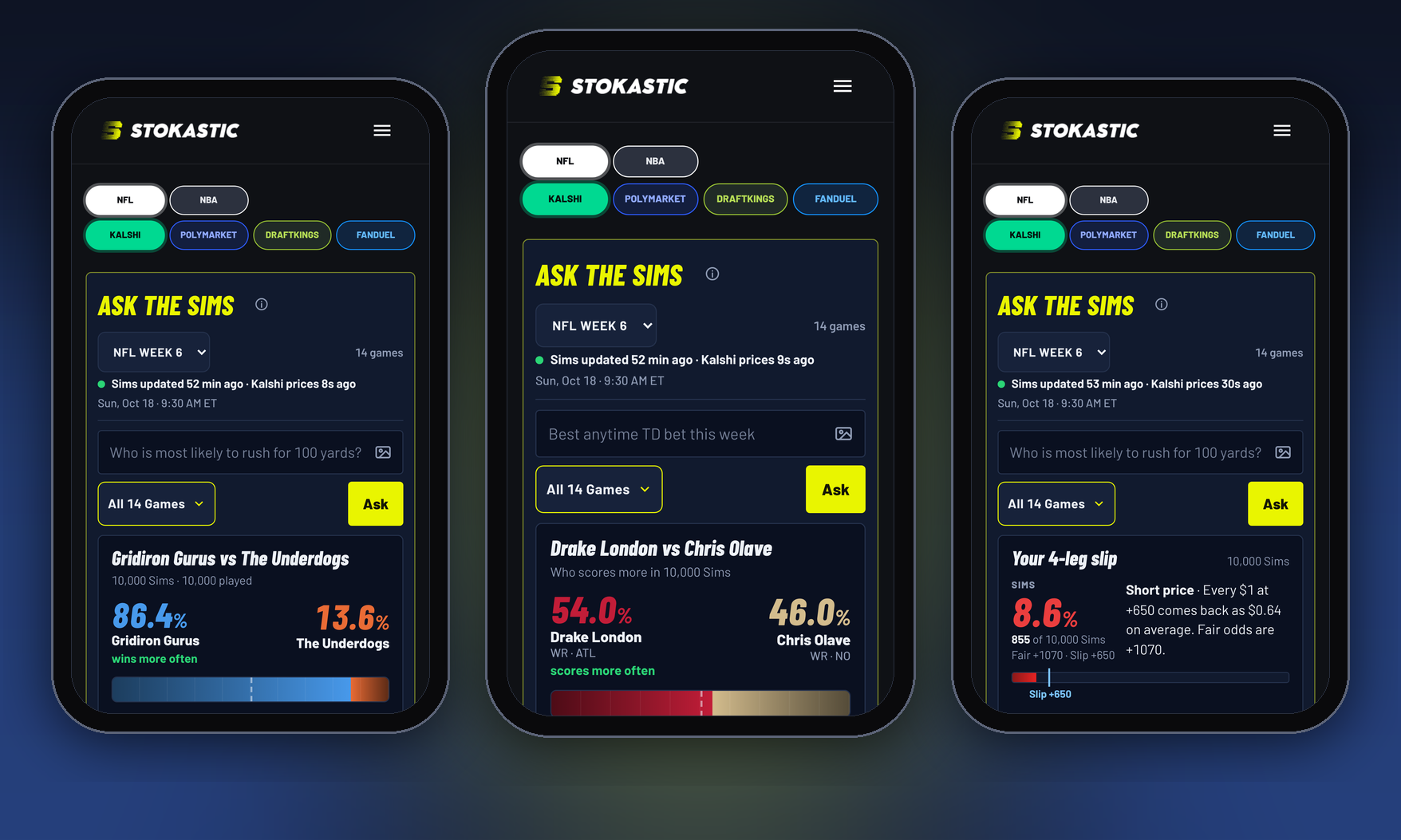
The three answers, Sunday morning on a phone: a matchup screenshot, a typed start/sit, a bet slip screenshot. Tap the image to open Ask the Sims.
What The Picture Button Does
The button sits at the right edge of the Ask field on Ask the Sims and on the NFL simulator pages. On a phone it opens your photo picker; on a computer you can also drop a file on the box or paste one from the clipboard. The picture is read on your own device, by your browser, and it is never uploaded anywhere.
It reads three kinds of picture: a fantasy matchup screen from Sleeper, ESPN or Yahoo; a bet slip from DraftKings or FanDuel; and a scrolled-down second screenshot of a matchup that was cut off the first time. Anything else gets "Couldn't find a matchup or a bet slip in that picture."
Your Fantasy Matchup
Take a screenshot of the matchup screen with the starters showing. Both lineups play every one of the 10,000 Sims together, and because every player in the same game shares that game's script in each run, the correlation is real: when your opponent's quarterback has a big day, your receiver on the same team has one too, in the same Sim.
What comes back:
- A split bar that fills from both sides as the Sims are counted, and your win chance.
- The fair spread and moneyline for the matchup, once both lineups are complete.
- Each team's typical week and range, every starter's typical points and range, and the swing player, the one whose range decides the most.
- The lineup check. If your bench is in the picture, every bench swap that fits a slot is tested against this opponent, and each move that raises your win chance animates in: the bench player slides into the slot, the bar moves, the gain pops. Then a toggle shows your lineup against the Sims' lineup. If no move helps, the check runs down your starters and says so.
- A share picture, sized for a phone, which opens your share sheet.
Scoring comes from the app in the picture: Sleeper and ESPN read as full PPR, Yahoo as half. If your league is different, type it beside the picture or after it, "half ppr", "standard", "te premium", "6 pt pass td", and the Sims re-score.
Games that have already been played count their final points from the picture, and a player whose game has started is locked in place, so a Sunday-afternoon drop still works. If the screenshot stops halfway through your lineup, the answer says so ("shows 5 of at least 13 starters"), and you tap Add the rest or drop a scrolled-down screenshot on the box.
Here is what the lineup check did with the demo roster, a made-up Sleeper-style team that starts weak players with better ones on the bench. The Sims tested 76 lineups, found four moves, and took the win chance from 35.7% to 86.4%: Chris Olave in for Zavion Thomas (+21.1%), Christian McCaffrey for Roschon Johnson (+16.8%), Jonathan Taylor for Kalif Raymond (+9.8%), Tyler Warren for Kyle Pitts (+3.0%). A real roster usually has nothing to fix, and the check says so with a row of check marks.
Your Bet Slip
Screenshot the slip before you place it. Every leg is counted in the same Sims: a parlay's price assumes the legs are independent, and they are not. The answer gives you the joint chance of every leg hitting, on the same price meter the simulators use, against the slip's own odds; the fair odds for the slip; what a dollar returns; and the quarterback the Sims start for a passing leg, named.
A leg the Sims cannot price, a market they do not carry, is named and left out of the joint chance, and the answer says the slip's odds include it, so the comparison is not made for you on a bad footing. Alt lines (60+ receiving yards), overs, unders, anytime touchdowns and cross-game slips are all in the build.
If the fair odds come back longer than the slip's, you are paying more than the legs are worth. Shorter, and the slip pays you more than fair.
The sample slip in the pictures, four Commanders-49ers legs at +650 on a DraftKings-style ticket, shows both halves of that. The Sims hit all four in 8.6% of the 10,000 runs, 855 Sims. If the legs had nothing to do with each other it would be 5.3%, so the correlation is doing real work: McCaffrey scoring, Kittle catching five and Daniels clearing 225.5 happen in the same kind of game. And the slip is still short: fair odds are +1070, and every dollar at +650 comes back as 64 cents on average. The correlation helped; the price took more than it gave.
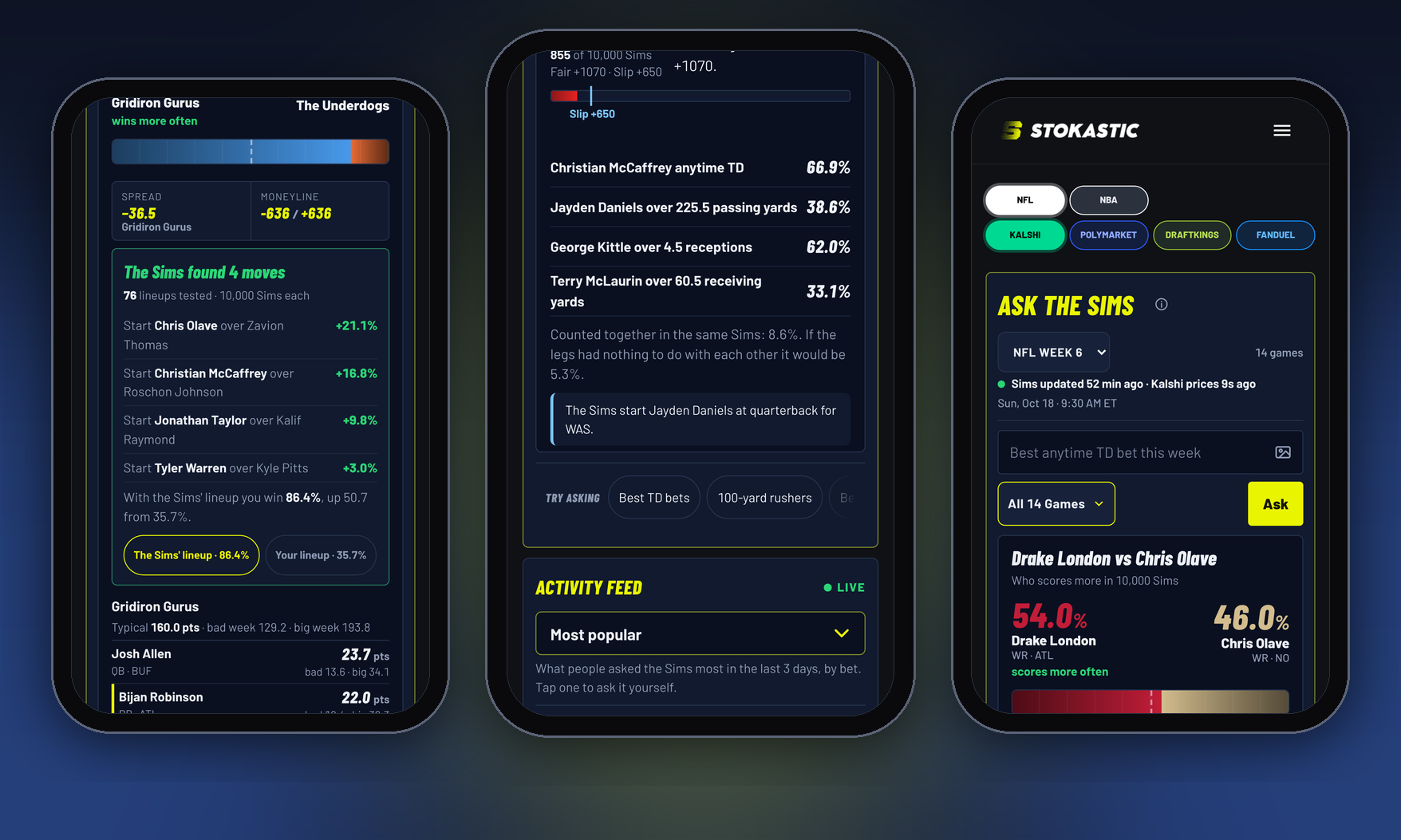
The lineup check's four moves, the slip's legs with each one's hit rate, and the start/sit card. Tap the image to open Ask the Sims.
A Straight Bet, Typed
A single line does not need a picture. Type it the way you would say it: "Nico Collins over 70.5 receiving yards", "Woody Marks anytime TD", "Jayden Daniels 250 passing yards". The answer is the regular Ask the Sims card: the share of 10,000 Sims where it hits, the price beside it on Kalshi, DraftKings or FanDuel, and the verdict on that price. On a game page, the question runs against that game's Sims; on the Ask the Sims hub it finds the game from the name.
Start Or Sit, Typed
Type "Drake London vs. Chris Olave", or "start London or Olave", up to four names, last names alone if they are not shared. What comes back is how often each player scores the most, as a split bar in team colors for two players or a bar each for three or four; each player's typical points; a bad-week-to-big-week bar, one Sim in ten below and one in ten above, running on to his ceiling; his share of 20-point weeks and under-5 weeks; and his best Sim.
The call is plain: "Start X" when the gap is 10 points or more, "Close call: lean X" when it is not. A name the Sims do not carry this week is named as such, never scored as a zero. A shared name ("Allen") gets a which-one question before anyone is counted.
Drake London against Chris Olave on Sunday morning came back 54.0% to 46.0%, "Close call: lean Drake London": London's typical week 18.4 points with a 20-point week in 43.8% of Sims, Olave's 17.1 and 37.8%. Both ceilings are in the 40s. That is a lean, and the card says so.
Before You Drop
- Three pictures per drop, 15 MB each. A phone screenshot is a tenth of that.
- iPhone photos saved as HEIC read fine through the phone's own picker, which hands over a JPEG. A HEIC file dragged in from a Mac in Chrome does not; take a screenshot or save it as JPG or PNG.
- Keep the starters on screen. The reader runs from the Starters header (or the first name row) to Bench. ESPN's slot column is read on its own.
- Two players with the same initial, team and position (Bijan Robinson and Brian Robinson) are the one case the reader has to guess. It picks the one the Sims give the ball to and flags him; check the name.
- This week's Sims only. No rest-of-season, no trade answers, and NFL pages only: the button is not on the NBA simulators or in the Ask box inside articles.
- A line, a stat, odds, a team or a parlay typed into the box goes to the regular Ask the Sims answer, not to this feature. The picture button is for lineups and slips.
The Sunday Order
- Saturday night: drop the matchup. Run the lineup check with your bench in the picture and make the swaps it finds.
- Sunday morning, after inactives post, 90 minutes before kickoff (11:30 a.m. ET for the 1 p.m. games): drop it again. Locked players stay locked; a starter ruled out is the swap the check will find first.
- Before you place a parlay: drop the slip. Read the fair odds against the slip's odds. Build or cut from there, or open the same legs in the DraftKings or FanDuel simulator and let the Sims find the best combo.
- For one question, type it. A start/sit, a single line, a touchdown scorer. The picture button is for the questions with ten names in them.
Open Ask the Sims, tap the picture button, and drop this week's matchup. If the Sims find a better lineup than yours, that is the swap to make before kickoff.
Ask the Sims counts outcomes across 10,000 simulations of each game; the percentages are estimates, not guarantees. Prices shown beside answers are the market's at the time of the ask and move. Screenshots are read on your device and are not uploaded.
More on this: Ask The Sims Wins: Winston's 1.7% Ticket Hit · NFL Week 6 Bold Predictions: 13 Games, 13 Sub-1% Sims · What People Asked the Sims: Week 6's 10 Biggest Questions · Sim 371 of 10,000: Dallas Trails 32-6 And Wins 36-35 · Sim 95 of 10,000: Texans 50, Jaguars 47, In Overtime
Open Ask the Sims, tap the picture button in the Ask field, and drop your matchup or your slip. Free, no login.
Get Started